Fastest Screenshot Cleaner vs SwipeWipe: bulk stack deletion in seconds vs swiping thousands of cards
SwipeWipe popularized month-by-month left/right card swiping, which feels engaging when you are fondly reviewing 80 vacation photos from last July. When you have 3,000 disposable screenshots, swiping one card at a time takes hours—and SwipeWipe’s recurring subscription adds ongoing cost. Fastest Screenshot Cleaner ($2.99 US one-time paid download, iOS 26+) groups screenshots into size, duplicate and Vision text stacks so you can tap Select All and clear hundreds in one PhotoKit operation.
1. Workflow speed math: 3-column stacks + Select All vs single-card swiping
Even at a brisk two seconds per decision, swiping left or right on 2,400 accumulated screenshots demands 80 minutes of uninterrupted thumb work. Worse, month-by-month queues mix receipts you must keep right next to accidental lock-screen captures, forcing constant mental context switching.
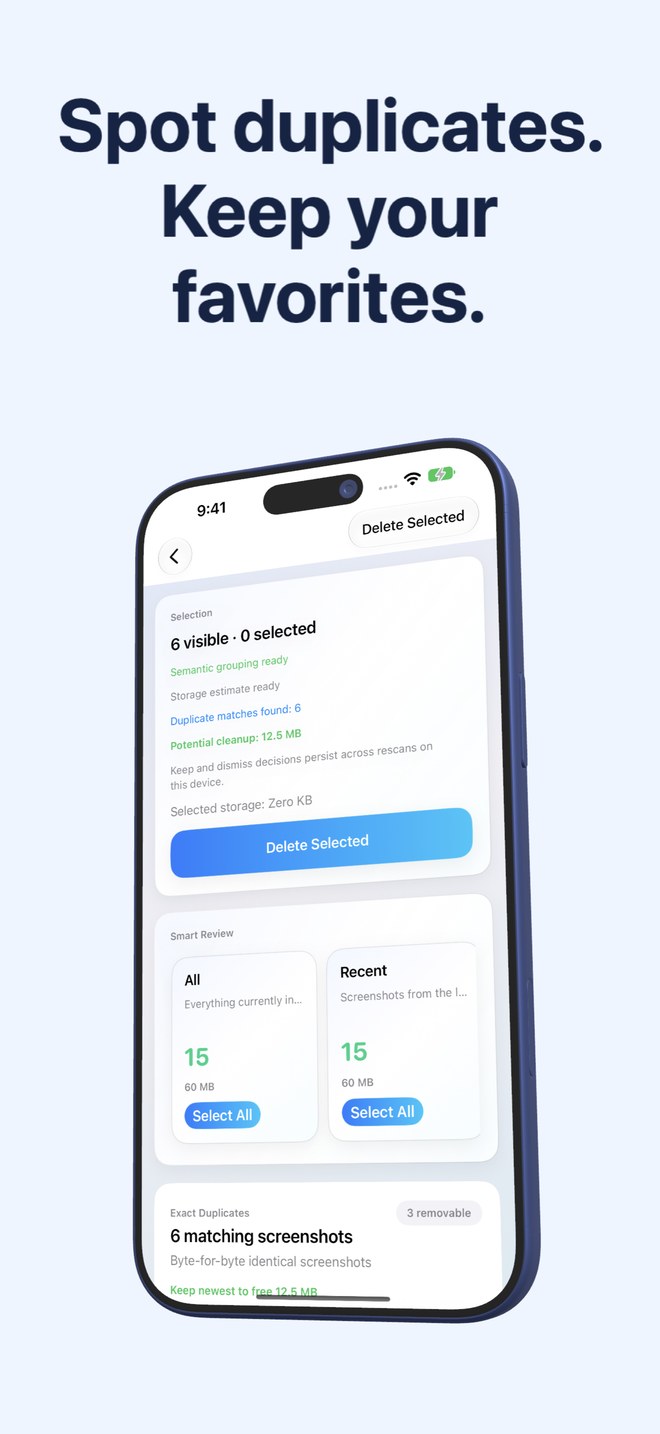
Fastest Screenshot Cleaner pre-sorts screenshots on your device before you start ticking. Open the Chats stack or Large stack, scan a three-column thumbnail grid at a glance, tap Select All (unchecking the one capture you want to keep), and press Delete Selected once.
| Workflow metric | Fastest Screenshot Cleaner | SwipeWipe |
|---|---|---|
| Primary review interface | Category cards -> 3-column thumbnail grid with Select All | Single full-card swipe left (trash) / swipe right (keep) by month |
| Clearing 500 old chat screenshots | Open Chats stack -> Select All -> review -> 1 Delete Selected tap | 500 individual swipe gestures across dozens of monthly folders |
| Storage size visibility upfront | Total screenshot weight + per-stack & selected byte totals | Focused on completing monthly progress bars rather than file size first |
| Duplicate screenshot handling | Keep Newest button marks extra copies in SHA-256 & Visual Match groups | Requires spotting duplicates visually as you swipe through a month |
| Camera-roll separation | Strict PhotoKit screenshot filter — camera photos never appear | Designed primarily around full monthly camera-roll review |
2. Content awareness: on-device Vision OCR vs chronological months
A screenshot from November 2024 could be an airline boarding pass you no longer need, a warranty invoice you still need, or a meme from a group thread. Chronological month buckets treat all three identically because they only inspect creation dates.
Fastest Screenshot Cleaner runs Apple’s Vision framework locally on your iPhone or iPad to read text on each screenshot and sort captures into Shopping, Invoices, Chats, Books, Code, Web and Apps, and Travel—without storing or uploading that text anywhere.
| Feature | Fastest Screenshot Cleaner | SwipeWipe |
|---|---|---|
| Topic-based text grouping | Yes — 7 on-device Vision OCR stacks (Invoices, Chats, Shopping, etc.) | No — organized primarily by calendar month and media buckets |
| Orientation & size filters | Built-in Recent, Portrait, Landscape and Large cards | Chronological month progression |
| On-device processing | 100% local PhotoKit, SHA-256 & Apple Vision | Local PhotoKit access; check App Store privacy label for analytics |
| Supported devices | Native iPhone & iPad support (iOS 26 / iPadOS 26+) | iOS camera-roll cleaner |
| 30-day recovery safety | Yes — system Photos sheet sends deleted items to Recently Deleted | Yes — batch trash review commits via iOS PhotoKit to Recently Deleted |
3. Pricing comparison: $2.99 paid download vs high-cost swipe subscriptions
Swipe-based cleaners frequently limit how many photos you can swipe per day on the free tier and charge weekly or yearly subscriptions (often ~$7–$10/week or ~$35–$50/year) to unlock unlimited swiping. Paying a recurring fee just to supply your own manual swiping labor is hard to justify for disposable screenshots.
Fastest Screenshot Cleaner is a one-time $2.99 US App Store purchase with no daily swipe caps, no subscription renewals and a Home Screen widget that quietly tracks when your next 60-second cleanup is worth running.
| Use case | Better option | Why |
|---|---|---|
| Reminiscing through camera-roll memories month by month | SwipeWipe (or manual Photos review) | Card-by-card viewing suits emotional photo curation |
| Wiping 1,000+ screenshots to reclaim storage in two minutes | Fastest Screenshot Cleaner | Stack cards + Select All + Keep Newest eliminate repetitive swiping |
| Avoiding weekly or annual cleaner subscriptions | Fastest Screenshot Cleaner | $2.99 one-time paid download with zero recurring charges |
| Tracking screenshot buildup automatically between cleanups | Fastest Screenshot Cleaner | Home Screen widget displays current screenshot count and weight |
Is swiping or grid batching safer against accidental deletion?
Swiping fast for 30 minutes causes thumb fatigue and mis-swipes. In Fastest Screenshot Cleaner, you open one specific stack (like Chats or Exact Duplicates), inspect thumbnails in a 3-column grid, confirm via the iOS Photos sheet, and still retain 30-day recovery in Recently Deleted.
Does Fastest Screenshot Cleaner limit how many screenshots I can delete per day?
No. There are no daily caps, energy bars or Pro unlocks—your one-time paid download unlocks unlimited scans and bulk deletions.
Can I select a whole stack and then uncheck two screenshots I want to keep?
Yes. Tap Select All inside any stack card, tap individual thumbnails in the three-column grid to deselect the ones you want to keep, and tap Delete Selected.
Does Fastest Screenshot Cleaner delete anything without asking?
Never. Nothing is deleted until you tap Delete Selected and approve the system iOS Photos confirmation prompt.