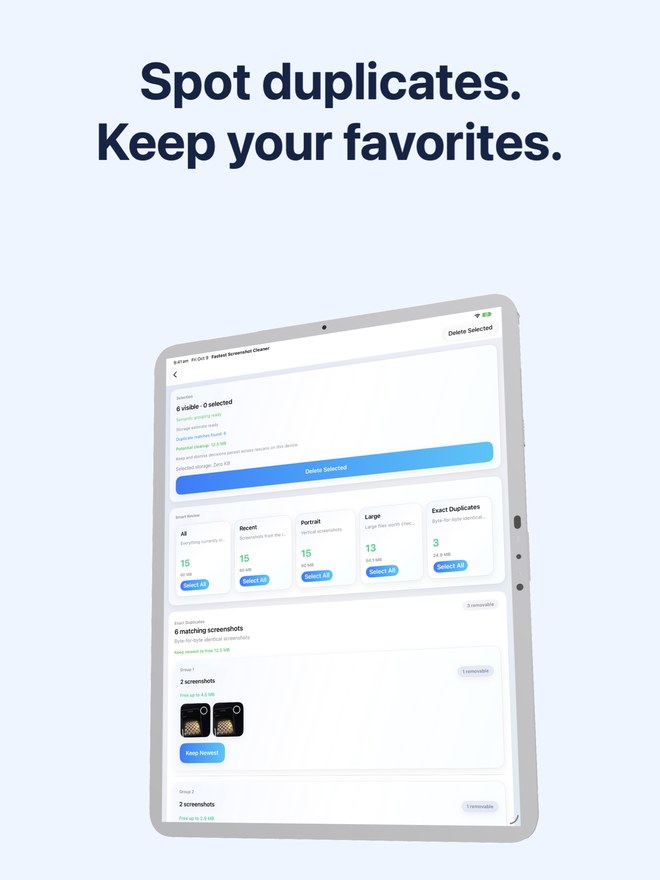
iPad Pro & iPad Air Screenshot Cleanup vs iPhone-Only Cleaners: taming 2064×2752 Retina iPadOS captures
Most App Store phone cleaners are designed solely for iPhone portrait screens—forcing iPad owners into awkward letterboxed `1x/2x` compatibility windows while paying weekly subscriptions. Yet iPads generate some of the heaviest screenshots in Apple’s ecosystem: full-canvas `2064×2752` Retina PNGs from Stage Manager, PDF textbooks, code editors and Apple Pencil corner swipes. Fastest Screenshot Cleaner ($2.99 US universal paid download, iOS 26 · iPadOS 26) runs natively on both iPad and iPhone.
1. Why iPad screenshots consume storage even faster than iPhone captures
Compare pixel counts: a modern iPhone screenshot frame at `1320×2868` carries roughly 3.78 million pixels, while an iPad Retina frame at `2064×2752` carries roughly 5.68 million pixels—50% more pixels per capture, often showing dense split-screen browsers, annotated PDFs, digital textbooks or multi-track timelines that resist PNG compression.
Add how easy it is to trigger accidental corner-swipe screenshots with a palm or Apple Pencil on iPadOS, and a 128 GB or 256 GB iPad Air or iPad Pro quickly accumulates gigabytes of Landscape and Portrait captures.
| Attribute | iPhone (iOS 26+) | iPad (iPadOS 26+) | How Fastest Screenshot Cleaner handles both |
|---|---|---|---|
| Capture dimensions (StoreFront frames) | 1320 × 2868 px (~3.8 MP) | 2064 × 2752 px (~5.7 MP) | Native universal UI tailored for both iPhone & iPad screens |
| Dominant aspect orientations | Mostly Portrait (some Landscape games/video) | Heavy mix of Landscape (split-view/keyboard) & Portrait | Dedicated Portrait and Landscape stacks separate them cleanly |
| Common high-volume screenshot types | Chats, Shopping, Travel passes, QR codes | Books, Code, Web & Apps research, PDF lecture slides, Invoices | On-device Vision OCR groups Books, Code, Web & Apps, Invoices, Chats… |
| Typical file weight of complex PNGs | Medium–Large | Extra Large (dense multi-window Retina canvases) | Large stack surfaces heaviest byte hogs immediately |
| License required | Same $2.99 Apple ID purchase | Same $2.99 Apple ID purchase | Buy once on the App Store, run on both devices |
2. Native iPadOS 26 grid vs letterboxed iPhone-only subscription cleaners
Open a typical "Phone Storage Cleaner" on an iPad and you immediately spot zoomed-in phone buttons, cramped single-card swipers that waste 70% of the display, and contact-merging tabs irrelevant to a Wi-Fi iPad.
Fastest Screenshot Cleaner treats iPadOS 26 as a first-class citizen—complete with native iPad gallery layouts, three-column stack grids where textbook pages, code snippets and invoices are legible without squinting, on-device Apple Vision text grouping, and an iPad Home Screen widget.
| iPad experience check | Fastest Screenshot Cleaner | iPhone-Only Phone Cleaners |
|---|---|---|
| Native iPadOS 26 layout | Yes — built natively for iPhone & iPad (`platforms: iPhone, iPad`) | Often runs in scaled phone compatibility mode |
| Orientation stack filtering | Separate Portrait & Landscape cards ideal for Magic Keyboard users | Rarely separates Landscape split-screen captures from Portrait |
| Study & developer OCR stacks | Dedicated Books, Code, Web and Apps & Invoices Vision stacks | Generic camera-roll buckets |
| Contacts / phone-number bloat | None — requests Photos permission only | Cluttered with SIM/contact/call-cleaner tabs useless on iPad |
| Pricing | $2.99 US one-time universal download | Weekly or annual per-account subscription |
3. Student, developer and creative iPad cleanup workflows
During an exam week or software sprint on an iPad, taking 400 reference screenshots of lecture slides, documentation and UI states is completely normal—and once the semester or sprint wraps up, Fastest Screenshot Cleaner lets you clear the Books, Code or Web and Apps stack in one tap while preserving Invoices.
| iPad user | Primary stacks to review | Result |
|---|---|---|
| Student after finals week | Books + Large + Visual Matches stacks | Clears hundreds of heavy textbook/slide captures after exporting key notes |
| Developer / designer testing layouts | Code + Web and Apps + Landscape stacks | Wipes UI bug captures & responsive browser tests in seconds |
| Shared iCloud Photos iPhone + iPad owner | All stacks on the spacious iPad screen | Cleans screenshots across both iPad and iPhone in one comfortable session |
Does Fastest Screenshot Cleaner run natively full-screen on iPad Air and iPad Pro?
Yes. Fastest Screenshot Cleaner is a universal app built natively for both iPhone (iOS 26+) and iPad (iPadOS 26+).
Does it detect screenshots taken with Apple Pencil corner swipe?
Yes. iPadOS marks Apple Pencil corner-swipe captures, hardware button captures and AssistiveTouch screenshots with the standard PhotoKit screenshot subtype.
What about hand-drawn notes exported as images from Goodnotes or Procreate?
Images exported from note or drawing apps are saved as regular images rather than system screenshots unless you captured the screen itself, so Fastest Screenshot Cleaner leaves exported artwork untouched.
Is the iPad version a separate purchase?
No. One $2.99 US paid download on your Apple Account covers both iPhone and iPad.